How to transfer NOL card Balance | Complete Guide
If you’re replacing your NOL card or have active NOL cards, you don’t have to lose your travel balance. The NOL card balance transfer feature provided by RTA is a free service that allows you to transfer NOL balance safely from one card to another. From my experience, it’s one of the easiest ways to keep your card balance secure when switching cards or managing more than one card. The entire balance transfer process is quick, reliable, and only takes a few minutes.
Table of Contents
ToggleYou can complete the balance transfer by following these simple steps:
- Open the RTA Dubai App on your smartphone.
- Sign in and select the NOL card balance transfer option.
- Use your phone’s NFC technology (Near Field Communication), a contactless technology, to scan your smart card.
- Follow the on-screen instructions to move balance through the mobile app using the digital transfer feature.
- Once completed, your remaining balance will be available on your public transport card, travel card, or transit card, so you can continue using RTA cashless services without interruption.
NOL Card Balance Transfer Methods
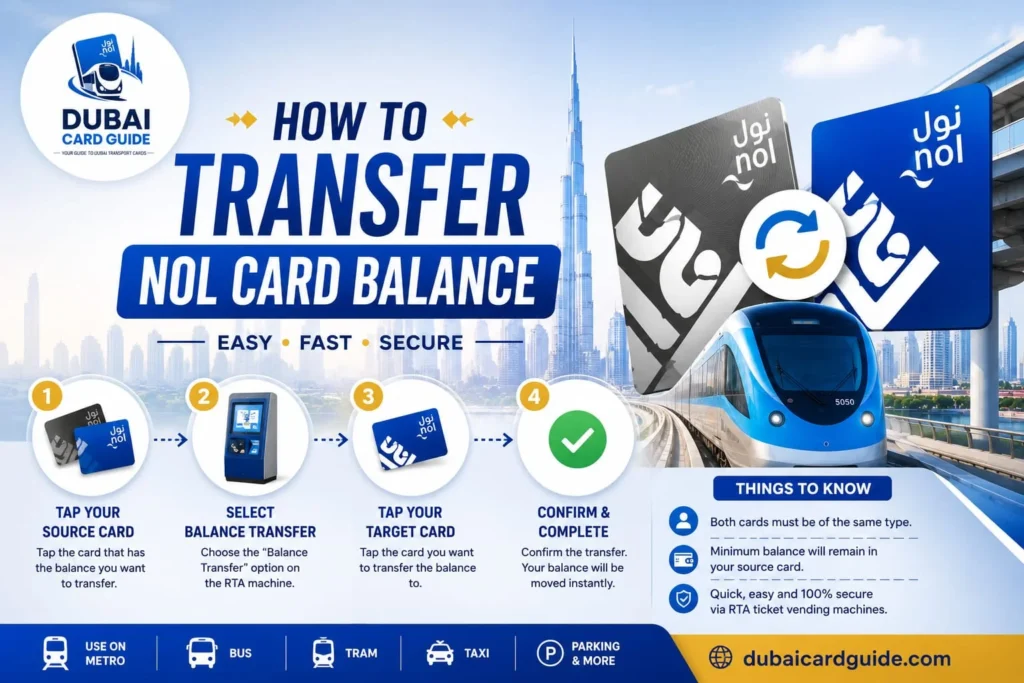
Here are the simple ways to transfer NOL card balance to another NOL card.
- Via the RTA Dubai App (Online)
- Transfer Using a Ticket Vending Machine
- Transfer at an RTA Customer Happiness Center
Method 1:Transfer via RTA App (NFC Method)
Using the RTA Dubai App is the fastest option and the most convenient option for completing a NOL card balance transfer. The app uses NFC (Near Field Communication), the same contactless payments technology found in modern smartphones, to securely transfer NOL balance between two cards. Before you begin, make sure you have a NFC-enabled smartphone, the latest version of the app, active NOL cards, and a stable internet connection.
- Download the RTA Dubai App from the Google Play Store or Apple App Store if it isn’t already installed.
- Open the RTA app on your Android or iPhone and turn on NFC from your phone settings. If you can find NFC settings, your phone supports the NFC feature.
- Select the NOL to NOL Transfer service to start the online transfer.
- Place the sender NOL card on the back of your mobile device and wait for card recognition.
- Remove the first card and place the recipient NOL card on the same spot.
- Enter the transfer amount (from minimum AED 5 to maximum AED 500).
- Review transaction details and confirm transaction.
- The digital transfer is processed instantly, and the balance transferred is usually available within two minutes.
Requirements
- A smartphone with NFC capability.
- The latest version of the RTA Dubai App.
- Two valid NOL cards that are not an expired card or blocked card.
- A reliable internet connection for a smooth online method.
- Once completed, the instant balance transfer updates your travel balance and card balance, allowing you to continue using cashless transfer services without interruption.


Method 2: Via Ticket Vending Machines
If you don’t want to use the mobile app, a Ticket Vending Machine is another reliable way to complete a NOL card balance transfer. These ticket vending machines are available at Dubai Metro stations, major bus stops, bus terminals, and RTA Customer Service Centers, making this method convenient for passengers already using Dubai’s public transport network.
- Locate a Ticket Vending Machine at a nearby Dubai Metro station or RTA location.
- Follow the on-screen instructions and insert sender card to begin the transfer balance process.
- Check your current balance, card balance, and the available options displayed on the screen.
- When prompted, insert receiver card and verify the receiver details carefully.
- Enter the transfer amount and confirm details before proceeding.
- Select confirm transfer and let the machine complete the process.
- Once finished, remove both cards. Your travel balance and updated balance are reflected through an immediate transfer, allowing you to continue using your public transport card, travel card, or transit card without delay.
Method 3: RTA Customer Happiness Centers
If you need in-person assistance or experience issues during a NOL card balance transfer, you can visit any RTA Customer Happiness Center in Dubai. This option is ideal for users who prefer a manual transfer or need extra help with corporate cards or student cards, where accuracy is especially important.
Before visiting, make sure you bring:
- Both NOL cards (sender NOL card and receiver NOL card).
- A valid ID, such as an Emirates ID or passport.
The RTA staff will transfer NOL balance, provide transfer confirmation, and ensure the transfer completed successfully. Although it may take slightly longer than an online transfer or machine-based transfer, it is a reliable option for resolving card-related issues.
Transfer Limits and Rules
- Minimum transfer amount: AED 5
- Maximum per transaction: AED 500
- Daily transfer limit: AED 1,000
- Both active NOL cards must be valid NOL cards before you transfer balance.
- These transfer limits and transfer rules help maintain a secure transfer process for all users.
Card Eligibility for Transfers
Before starting a NOL card balance transfer, it’s important to check your card eligibility. Not every card can transfer NOL balance, and some card types have transfer restrictions based on RTA rules. Both cards must be active NOL cards, have a valid card status, and remain in good standing to complete the transfer process successfully.
Before starting a NOL card balance transfer, make sure your card is eligible. Here’s a quick overview:
✅ Blue Card – Eligible for balance transfers.
✅ Silver Card – Eligible for balance transfers.
✅ Gold Card – Eligible for balance transfers.
✅ Student Card – Eligible, but some transfer limits may apply.
⚠️ Corporate Card – Balance transfers are available, but certain restrictions may apply depending on your card.
❌ Anonymous Card – Not eligible for balance transfers.
❌ Red Ticket – Not eligible for balance transfers.
Technical Requirements For Transfers
To ensure smooth transfer, keep these technical points in mind:
- Both cards must be physically present during the transfer.
- During NFC transfers, hold cards within 4 cm of your phone.
- Keep your internet connection stable during the process.
- Once the transfer is complete, it cannot be reversed.
- The transferred balance usually appears within 24 hours after activation at a gate or machine.
NOL Card Balance Transfers Fees
One of the best things about the NOL card balance transfer service is that RTA does not charge any transfer fees when you use the NOL to NOL transfer option. Whether you’re moving your travel balance to a replacement card or simply managing multiple cards, the free balance transfer service lets you transfer NOL balance without any additional transfer cost. In my experience, this makes it much easier to switch cards without worrying about extra charges.
If you decide to request a balance refund instead of a balance transfer, different rules apply. RTA charges a service fee based on the cash value available in your NOL card balance. The refund fee is 2.5% fee of the refunded amount or 5 AED, whichever is the higher amount. This fee only applies to the refund process and not to the regular free transfer service.
Benefits of NOL Card Balance Transfer
The NOL card balance transfer feature makes it easy to move funds between cards whenever you need them. Whether you use a Dubai Metro card for your daily commute or occasionally travel across Dubai, this online transfer service helps you manage your travel balance without hassle. In my experience, it’s one of the most practical features available in the RTA Dubai App, especially if you already use NOL card recharge and NOL card balance check services to keep your card ready for every journey.
Here are some of the biggest benefits:
- Help Friends and Family: Use the NOL to NOL transfer feature to share balance or transfer credit to friends, family members, or loved ones so they can continue using Dubai public transport without interruption.
- Transfer Anytime, Anywhere: Complete an online balance transfer through the RTA Dubai App using NFC technology for a secure contactless transfer. There’s no need to visit a metro station or customer service center—you can transfer from home, the office, or while travelling.
- No Extra Charges: RTA Dubai offers this free balance transfer as a free service, so there are no service charges when moving balance between eligible NOL card users.
- Better Travel Management: Keeping your card balance updated makes it easier to use your Dubai Metro Pass, smart card, and other transportation services for cashless travel and daily travel. If you’re following Dubai transportation guides, this feature works perfectly alongside NOL card recharge and NOL card balance check for a smoother commuting experience.
Troubleshooting Common Problems
Although the NOL card balance transfer process is usually straightforward, you may occasionally face a few problems. The good news is that most balance transfer issues can be fixed within minutes without contacting support. If your transfer NOL balance request doesn’t go through, use the troubleshooting steps below before trying again.
Card Not Scanning
- Make sure NFC is turned on or NFC enabled in your phone settings.
- Remove any thick or metal phone case that could block the connection.
- Wipe the card surface and clean NOL card before scanning.
- Place the NOL card against the back of phone and move it slowly until the app can scan card successfully.
- If the problem continues, restart app or reopen the RTA Dubai App.
Transfer Stuck or Fails
- Close and reopen app, then start the online transfer again.
- Check that both the sender card and receiver card are active NOL cards and not an expired card.
- Make sure the card balance or travel balance is sufficient before starting the transfer.
- Verify that you have a stable internet connection.
- If the transfer failed or remains transfer stuck, wait a few minutes and retry transfer.
No NFC on Phone
If your smartphone doesn’t have NFC support, you can still complete the transfer using a ticket vending machine or by visiting an RTA Customer Happiness Center. Both options provide the same manual transfer service, making contactless transfer possible even without NFC.
Tips for a Smooth and Secure NOL Balance Transfer
Before starting a NOL balance transfer, a few small checks can save time and prevent avoidable problems. I’ve noticed that users who keep their NOL card in good condition and verify their details beforehand usually complete the transfer much more smoothly. These simple habits also help keep your card balance secure.
For the best experience, follow these tips:
Register your NOL card whenever possible. A registered NOL card makes refund requests and balance recovery much easier if something goes wrong.
Keep your NOL card clean and free from damage so accurate scanning works properly during the transfer.
When using NFC, avoid placing multiple cards near your phone. This helps prevent scanning errors and transfer errors.
Always check balance and confirm the validity date before you transfer balance.
For better security, never share your card details or NOL tag ID with others.
Following these precautions helps protect your card protection and privacy, while making the NFC transfer process smoother and more reliable.
Conclusion
Transferring your NOL card balance is a simple and secure way to keep your travel funds available when switching cards or managing multiple NOL cards. Whether you choose the RTA Dubai App, a Ticket Vending Machine, or an RTA Customer Happiness Center, each method is designed to make the process quick and convenient. Before starting, make sure both cards are active, check your balance, and follow the eligibility requirements to avoid delays.
If you’re unsure about your remaining balance, perform a NOL card balance check first, then complete a NOL card recharge if needed before transferring funds. By understanding the transfer rules, limits, fees, and eligibility requirements, you can use your Dubai Metro card with confidence and enjoy uninterrupted travel across Dubai’s public transport network.
Frequently Asked Questions
Yes. RTA Dubai allows eligible users to transfer their NOL card balance from one NOL card to another. This service is available for supported cards and helps you keep your travel balance when switching or replacing a card. You can complete the transfer using the RTA Dubai App, a Ticket Vending Machine, or an RTA Customer Happiness Center.
Transferring your NOL card balance is simple. Just follow these steps:
- Open the RTA Dubai App and select the NOL to NOL Transfer service.
- Scan both active NOL cards using your phone’s NFC feature.
- Enter the transfer amount and confirm the details.
- Wait for the transfer to complete. The balance is usually updated within a few minutes.
If your phone doesn’t support NFC, you can also transfer your balance using a Ticket Vending Machine or by visiting an RTA Customer Happiness Center.
Yes, you can withdraw the cash value from your NOL card balance if you meet RTA‘s eligibility requirements. Instead of transferring the balance to another card, you can request a balance refund. Keep in mind that RTA charges a service fee of 2.5% of the refunded amount or AED 5, whichever is higher.
To transfer your NOL card balance to another card, open the RTA Dubai App and use the NOL to NOL Transfer service. Scan both active NOL cards using your phone’s NFC feature, enter the transfer amount, and confirm the transaction. If your phone doesn’t support NFC, you can also use a Ticket Vending Machine or visit an RTA Customer Happiness Center.
Yes. Besides paying for Dubai Metro and other public transport, you can use your NOL Card at RTA parking meters, selected retail stores, supermarkets, petrol stations, parks, and participating restaurants. It works as a convenient cashless payment card for a variety of everyday purchases and services in Dubai.
Yes. You can transfer your NOL card balance to another eligible NOL card using the RTA Dubai App, a Ticket Vending Machine, or an RTA Customer Happiness Center, subject to RTA’s transfer rules.
Yes, you can share your NOL card balance with another eligible NOL card by using the NOL to NOL Transfer service provided by RTA Dubai.
Yes. Eligible NOL cards can be added to supported digital wallets through the NOL Pay app, allowing convenient contactless payments on compatible devices.
If you lose a registered NOL card, contact RTA immediately to block the card and protect your remaining balance. In most cases, you can recover the balance and transfer it to a replacement card, subject to RTA’s policies.
The validity of a NOL card depends on its type, but most personalized Blue, Silver, and Gold NOL cards are valid for 5 years from the date of issue.