Virtual NOL Card Dubai 2026: How to Get, Use & Recharge
Virtual NOL Card is the digital version of Dubai’s RTA smart travel card that lets you pay for the Dubai Metro, buses, trams, public parking, and selected retail stores directly from your smartphone. Instead of carrying a physical card, you can tap your compatible device to travel and manage your balance through the official nol Pay app.
Table of Contents
Toggle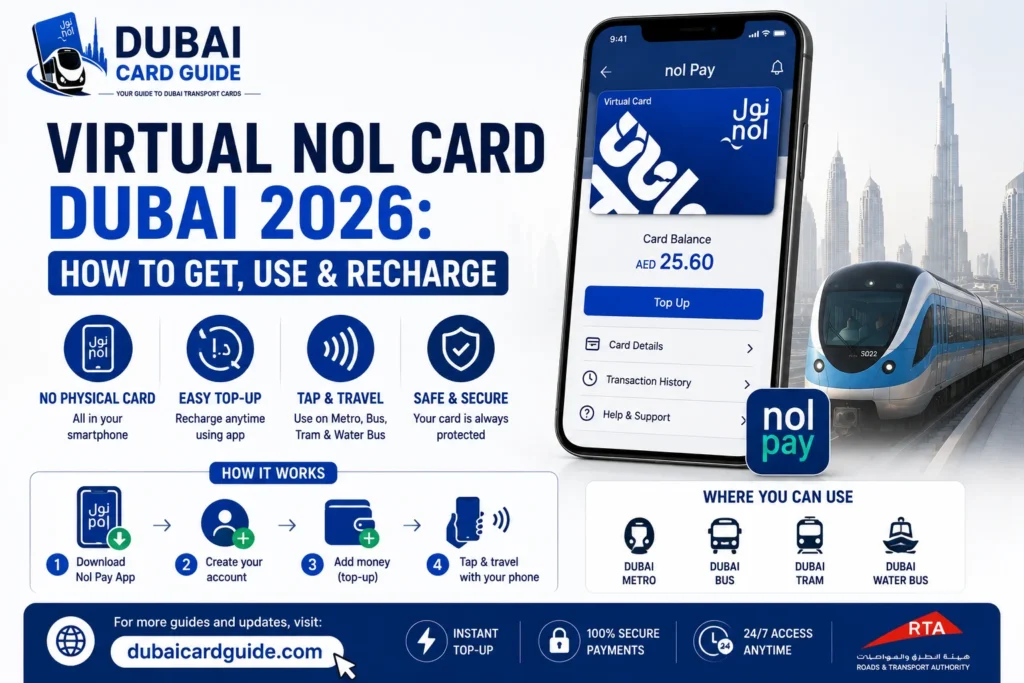
In this guide, you’ll learn how to get a Virtual NOL Card, which phones support it, how to convert a physical card, recharge it online, check your balance, and solve common issues. By the end, you’ll know whether a Virtual NOL Card is the right choice for your daily travel in Dubai.
What Is a Virtual NOL Card?
A Virtual NOL Card is a digital version of the RTA NOL Card that allows you to pay for public transport in Dubai using a compatible smartphone instead of a physical card. It offers the same purpose as a regular NOL Card while making daily travel more convenient through digital access.
With a Virtual NOL Card, you can use your phone to travel on the Dubai Metro, Dubai Tram, RTA buses, and other supported transport services. It can also be used for RTA parking payments and purchases at selected retail outlets that accept NOL payments.
Unlike a physical card, everything is managed digitally through the official nol Pay app. You can create a new virtual card, convert an eligible physical NOL Card, check your balance, and top up your card online without carrying an extra card.
Key Features of a Virtual NOL Card
- Works on supported NFC-enabled smartphones.
- Pay for the Dubai Metro, buses, trams, and other RTA transport services.
- Recharge your card online through the nol Pay app.
- Check your Virtual NOL Card balance anytime.
- Make contactless payments by tapping your phone at supported readers.
- Can also be used for RTA parking and selected retail purchases.
- Eliminates the need to carry a physical NOL Card for supported devices.
Which Phones Support the Virtual NOL Card in 2026?
Not every smartphone can use a Virtual NOL Card. To tap and travel, your device must support NFC (Near Field Communication) and be compatible with the latest nol Pay digital card services. Before creating or converting a card, it’s a good idea to check whether your phone is supported.
Android Phones
Most supported Android devices with NFC can create and use a Virtual NOL Card through the nol Pay app. Some compatible Samsung phones also allow you to use the card with Samsung Wallet, making contactless travel even more convenient.
Samsung Devices
Selected Samsung Galaxy phones support both the nol Pay app and Samsung Wallet for Virtual NOL Cards. After setup, you can simply tap your phone at Metro gates, bus validators, or tram readers instead of using a physical card.
Huawei Devices
Certain Huawei smartphones and supported Huawei Watch models are also compatible with the Virtual NOL Card. Once activated, you can use your device to pay for eligible RTA transport services just like a physical NOL Card.
iPhone Support
At the time of writing, Virtual NOL Cards are not available for Apple Wallet on iPhone. While iPhone users can use the nol Pay app for some account-related services, tap-to-travel with a Virtual NOL Card is not currently supported.
Before You Get Started
Before creating a Virtual NOL Card, make sure that:
- Your phone supports NFC and it is turned on.
- You have installed the latest version of the nol Pay app.
- Your device is listed as compatible with RTA’s Virtual NOL Card services.
- If you’re converting a physical NOL Card, keep it with you during the setup process.
How to Get a New Virtual NOL Card
Getting a new Virtual NOL Card in Dubai is a simple digital process that allows you to use your smartphone as a travel card instead of carrying a physical NOL Card. The process is completed through the official nol Pay app, where you can create, manage, and use your digital card on a compatible NFC-enabled device.
Before starting, make sure your smartphone supports NFC and that you have the latest version of the nol Pay app installed.
1: Download the Official nol Pay App
First, download the nol Pay app on your smartphone. The app is available for supported mobile devices and allows users to manage their NOL Card services digitally.
After installing the app, open it and continue with the registration process.
2: Sign In to Your Account
Create a new account or sign in using your existing details. Completing the login process allows the app to connect your digital NOL services with your profile.
Make sure your account information is accurate before creating a Virtual NOL Card.
3: Open the Digital NOL Card Services
After signing in, access the digital card section inside the nol Pay app.
Here, you can find options related to Virtual NOL Card services, including creating a new card or managing existing NOL Card options.
4: Select the Virtual NOL Card Option
Choose the option to create a new Virtual NOL Card and follow the instructions shown in the app.
The virtual card will be created digitally and linked to your compatible smartphone, allowing you to use your device for contactless travel payments.
5: Review the Price and Complete Payment
Before completing the setup, review the applicable charges shown in the app.
Complete the payment process using the available payment method to activate your Virtual NOL Card.
6: Activate Your Virtual NOL Card
Once the setup is complete, activate the card through the nol Pay app.
After activation, your smartphone can be used for supported NOL services, including Dubai Metro, buses, trams, and other accepted payment locations.
Make sure NFC is enabled on your device before using your phone at NOL card readers.
How to Convert a Physical NOL Card to a Virtual NOL Card
If you already use a physical NOL Card, you may be able to switch to a Virtual NOL Card without creating a completely new travel card. The conversion process allows eligible users to move their physical NOL Card services to a smartphone and manage their travel payments digitally through the nol Pay app.
Before starting the process, make sure your device is compatible and supports NFC, as the virtual card requires contactless communication with NOL card readers.
Steps to Convert Your Physical NOL Card
Follow these steps to convert a physical NOL Card into a digital version:
- Open the nol Pay app on your smartphone.
- Sign in to your account and access NOL Card services.
- Select the option to digitise or convert your existing NOL Card.
- Follow the instructions provided in the app.
- Keep your physical card near your phone when required for verification.
- Complete the activation process to start using your Virtual NOL Card.
Once the conversion is completed, your digital card will be available on your compatible smartphone for supported transport services.
Which Physical NOL Cards Can Be Converted?
Only eligible NOL Cards can be converted into a Virtual NOL Card. Availability depends on the card type, device compatibility, and services supported by the nol Pay app.
Before converting, check that:
- Your smartphone supports NFC.
- Your NOL Card is eligible for digitisation.
- You are using the latest version of the app.
What Happens to Your Physical Card After Conversion?
After successful conversion, your physical NOL Card may no longer be used in the same way because the card services are moved to the digital version.
Your existing balance and eligible travel products may remain available through your Virtual NOL Card, allowing you to continue using NOL services through your smartphone.
How to Use a Virtual NOL Card?
A Virtual NOL Card works like a regular NOL Card but is stored digitally on your smartphone. Instead of carrying a physical card, you can make contactless payments by tapping your device on supported NOL readers across Dubai.
To use the card successfully, your phone must support NFC and have this feature enabled. Once activated, the digital card can be used for different public transport services and other supported payments.
Travelling on Dubai Metro
The Dubai Metro supports Virtual NOL Card payments through contactless readers installed at metro gates.
To enter or exit a station, simply tap your phone on the NOL card reader and wait for the confirmation. The correct fare will be automatically deducted from your available card balance.
Paying Bus Fares with Your Virtual NOL Card
Passengers can use their digital card on RTA buses by tapping their NFC-enabled smartphone on the validator when boarding and leaving the bus.
The system detects your journey automatically and updates your balance after completing the trip.
Using It on Dubai Tram
The Dubai Tram network also accepts Virtual NOL Card payments. Place your smartphone near the reader at tram stations to complete your journey without using a physical card.
Make sure the phone is held close to the reader until the transaction is confirmed.
NOL Payments for Parking
A Virtual NOL Card can also be used for eligible parking payments where NOL payment options are available.
This allows users to complete selected RTA payments directly from their smartphone without carrying additional cards.
Paying at Retail Stores
Apart from transport, NOL payment services are available at selected retail stores and other supported locations.
Before making a payment, confirm that the merchant accepts NOL payments and then use your digital card through the supported payment method.
How to Tap Your Phone Correctly
For smooth contactless travel, follow these simple steps:
- Turn on NFC before starting your journey.
- Hold the NFC area of your smartphone close to the NOL card reader.
- Keep your phone steady until you receive confirmation.
- Ensure your device has enough battery during travel.
How to Recharge a Virtual NOL Card
Keeping your Virtual NOL Card balance updated is simple and can be done through digital and offline options. The easiest method is using the nol Pay app, where users can add funds directly from their smartphone and continue using their card for Dubai transport services.
A recharge works the same way as a physical NOL Card, but the updated balance is managed through your digital card account.
Recharge Through the nol Pay App (NFC)
The nol Pay app is the most convenient way to top up your Virtual NOL Card.
Follow these steps:
- Open the nol Pay app on your smartphone.
- Select your Virtual NOL Card.
- Choose the recharge or top-up option.
- Enter the required amount.
- Complete payment using an available payment method.
After successful payment, the updated balance can be synced through the app using NFC if required.
Recharge Through the RTA Website
You can also complete an online recharge through the official RTA website.
This option allows users to add funds remotely by entering their NOL Card details and completing payment using available online payment options.
Recharge at Metro Stations and Kiosks
For users who prefer in-person options, recharge services are available through Metro stations and self-service kiosks across Dubai.
These machines allow you to add funds to your NOL account and continue using your card for daily travel.
Recharge Through Retail Stores
Selected retail stores and authorized outlets also provide NOL recharge services.
This option can be useful when you need to quickly add funds while travelling or when digital recharge options are not available.
For a detailed guide on all available methods, check our complete NOL Card Recharge guide.
Keeping enough NOL Card balance ensures that you can use Dubai Metro, buses, and other supported services without interruptions.
How to Check Virtual NOL Card Balance
Checking your Virtual NOL Card balance helps you know how much travel credit is available before using Dubai public transport. Since the card is stored digitally, you can view your remaining balance through online tools without visiting a physical recharge location.
The easiest ways to check your balance are through the nol Pay app and the official RTA website.
Check Balance Through the nol Pay App
The nol Pay app provides a quick way to view your NOL Card balance directly from your smartphone.
To check your available balance:
- Open the nol Pay app.
- Sign in to your account.
- Select your Virtual NOL Card.
- View the available balance and card information.
This method is useful because your digital card details and travel balance are available in one place.
Check Balance Through the RTA Website
You can also use the official RTA website to check your Virtual NOL Card balance online.
Enter your required card details and follow the instructions to view your current balance information.
This option is helpful for users who prefer checking their balance through a browser instead of a mobile app.
For a complete guide covering all balance-checking methods, visit our NOL Card Balance Check guide.
Keeping track of your remaining balance helps avoid payment issues when travelling through Dubai Metro, buses, and other supported NOL services.
Virtual NOL Card vs Physical NOL Card
| Feature | Virtual NOL Card | Physical NOL Card | Which One Is Better? |
|---|---|---|---|
| Form | Digital card stored on a compatible smartphone with NFC support. | Traditional plastic travel card used by tapping at NOL readers. | Virtual card is more convenient because you do not need to carry an extra card. |
| Convenience | Simply tap your phone for transport payments without searching for a physical card. | Requires carrying the card separately and keeping it available during travel. | Virtual NOL Card offers a smoother daily travel experience. |
| Security | Protected through smartphone security features and digital account management. | If lost, the card may need replacement depending on the card type. | Digital cards provide better protection when linked to a secure device. |
| Recharge Options | Recharge through the nol Pay app and supported online methods. | Can be recharged through apps, machines, stations and retail locations. | Both support recharge, but virtual cards offer faster digital management. |
| Balance Protection | Managed digitally through supported NOL services and linked accounts. | Personalized cards may offer balance protection and replacement options. | Personalized physical cards still provide strong protection features. |
| Supported Devices | Requires a compatible device with NFC support. | Works independently without requiring a phone. | Physical cards are better if your phone is not compatible. |
| Daily Usage | Ideal for users who prefer contactless payments through their phone. | Suitable for tourists, residents, and users who prefer a simple travel card. | Choice depends on your travel habits and device support. |
Common Virtual NOL Card Problems & Solutions
Although a Virtual NOL Card makes Dubai travel more convenient, users may sometimes face issues during setup, recharge, or daily usage. Most problems are related to NFC settings, device compatibility, or app configuration.
Below are common issues and their possible solutions.
Phone Does Not Detect the NOL Card
If your smartphone cannot detect the card during setup or usage, check the following:
- Make sure your phone supports NFC.
- Turn on NFC from your smartphone settings.
- Keep the card or phone close to the NFC scanning area.
- Update the nol Pay app to the latest version.
A weak NFC connection or unsupported device can prevent successful detection.
NFC Is Not Working
The NFC not working issue is one of the most common problems with digital travel cards.
Try these solutions:
- Restart your smartphone.
- Confirm that NFC is enabled.
- Remove phone cases that may block NFC signals.
- Test NFC with another compatible service.
If NFC still does not work, your device may not support the required Virtual NOL Card features.
Samsung Wallet Does Not Show the NOL Card
Some users may face problems when adding their card to Samsung Wallet.
Possible solutions:
- Ensure you are using a supported Samsung device.
- Update Samsung Wallet and the nol Pay app.
- Check that your Samsung account region and settings are compatible.
- Try setting up the card again through the official app.
Virtual NOL Card Does Not Work at Metro Gate
If your card is not working at the metro gate, check these points:
- Make sure your phone is unlocked if required.
- Keep the NFC area of your device close to the card reader.
- Confirm that your card has sufficient balance.
- Check whether your Virtual NOL Card is activated.
A temporary app or connection issue can also prevent successful contactless payment.
Phone Battery Is Dead During Travel
A major concern with digital cards is what happens when the smartphone battery runs out.
Unlike a physical card, a Virtual NOL Card depends on your device being available. To avoid problems:
- Keep your phone charged before travelling.
- Carry a power bank during long journeys.
- Plan your travel if your battery level is low.
Changed or Lost Phone
If you change or lose your smartphone, you should secure your account and follow the required recovery process through official NOL services.
Before changing devices, make sure your card information and account details are properly managed through the nol Pay app.
Keeping your device secure helps protect your digital travel card and associated balance.
Conclusion
The Virtual NOL Card is a convenient digital travel card that allows users to access Dubai public transport through their smartphone without carrying a physical card. With easy management through the nol Pay app, users can enjoy simple travel, recharge, and balance checking options.
For a smoother experience, keep your card updated and explore our guides on NOL Card Recharge and NOL Card Balance Check.
Frequently Asked Questions
No. Currently, iPhone users cannot use a Virtual NOL Card for tap-to-travel through Apple devices. Although the nol Pay app is available on iOS, full digital travel card functionality is currently limited to supported devices. iPhone users should continue using a physical NOL Card for Dubai transport payments.
The Virtual NOL Card currently works on compatible Samsung devices and Huawei devices that meet the required compatibility conditions. Some supported Huawei smartwatches may also provide digital travel functionality.
Yes, eligible Samsung users can add their card through Samsung Wallet. Your device must be compatible, have the required software version, and support contactless payments.
Yes, eligible users can convert physical NOL Card services into a digital version through the nol Pay app.
The process uses NFC technology to read your existing card and transfer the available card details. However, only eligible cards and compatible devices can complete the conversion process.
After successfully converting your physical NOL Card into a Virtual NOL Card, the original plastic card will no longer work as an active travel card.
The card services are moved to the digital card, which can then be managed through your supported smartphone.
No. The same converted card cannot remain active in both physical and digital forms at the same time.
After conversion, your original card becomes inactive. However, you can still own another separate physical NOL Card if needed.
You can recharge your Virtual NOL Card through supported digital platforms by selecting the top-up option, entering the amount, and completing payment.
The recharge process may vary depending on the platform you use. For complete recharge methods, check our NOL Card Recharge guide.
You can check your NOL Card balance through the nol Pay app or by using available online services through the RTA website.
Checking your balance before travelling helps ensure you have enough credit for Dubai public transport journeys.
No. If your phone battery dies completely, you may not be able to access your Virtual NOL Card for travel.
Since the card depends on your smartphone’s contactless system, it is recommended to keep your phone charged before travelling or carry an alternative payment option.
Availability depends on device compatibility and the supported digital services available at the time. Tourists with compatible devices may be able to use digital NOL services, while others can continue using traditional NOL card options for travelling around Dubai.